Plan your week with Carnivor
Meal Plan gives you a place to organize the week before it happens. You can build a plan yourself or use generation as a starting point, then review the food and portions for each day.
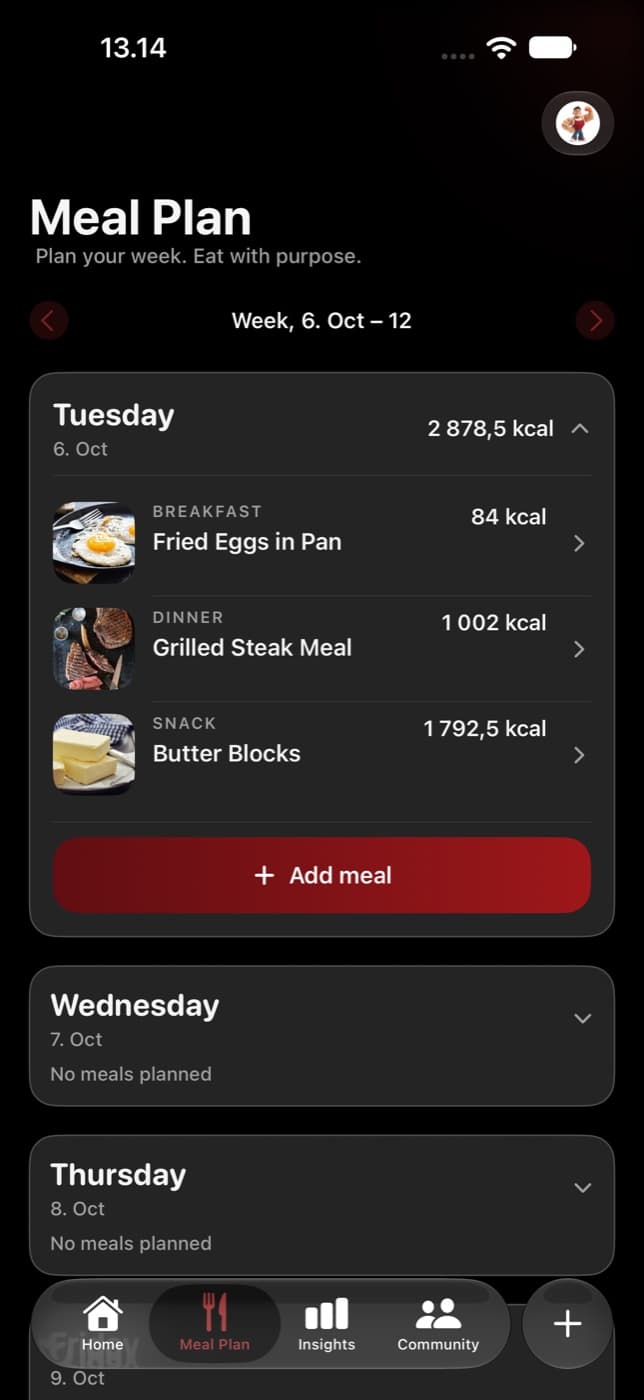
Build a plan manually or with AI
- Choose a current or future week. Start an empty plan or open an existing one.
- To build it yourself, open a day and tap Add meal when that action is available. Follow the food-entry flow and review the preview.
- To start with suggestions, choose Generate with AI, review your preferences, and wait for the generated plan.
- Check the resulting days, foods, meal types, and portions. Treat generated meals as suggestions you can review, not as a prescription.
Some controls and access can depend on your subscription and app version. Add meal is available only for eligible days and meal slots; a past or completed day may not show it.
Review portions and totals
A planned meal has its own food amounts and nutrition totals. Open it to review the ingredients and use the available portion or food controls. Saving changes updates the plan’s totals, so check the day summary afterward.
If the app reports that the plan changed while you were editing, reopen the meal and review its latest values before saving again. This helps avoid applying an edit to an outdated portion list.
Log what you actually ate
- Open the planned meal’s logging action when it is available.
- Compare the plan with the foods and amounts you actually ate. Make any available corrections before confirming.
- Confirm Log Meal and wait for the result.
- Check your daily Nutrition log to make sure the meal was recorded.
If what you ate differs substantially from the plan, use a fresh meal log with the correct foods and portions. The record is more useful when it follows the meal you ate.
Use previous plans as a reference
You can review saved previous weeks for ideas and context. A copy-previous-week action is not documented here because it was not verified in the current app. Create or edit a current plan rather than assuming that navigating to history copies it.