Understand Nutrition Insights
Insights turns recorded meals into a view across days, weeks, and months. Start with the range and the number of logged days so the averages have the right context.
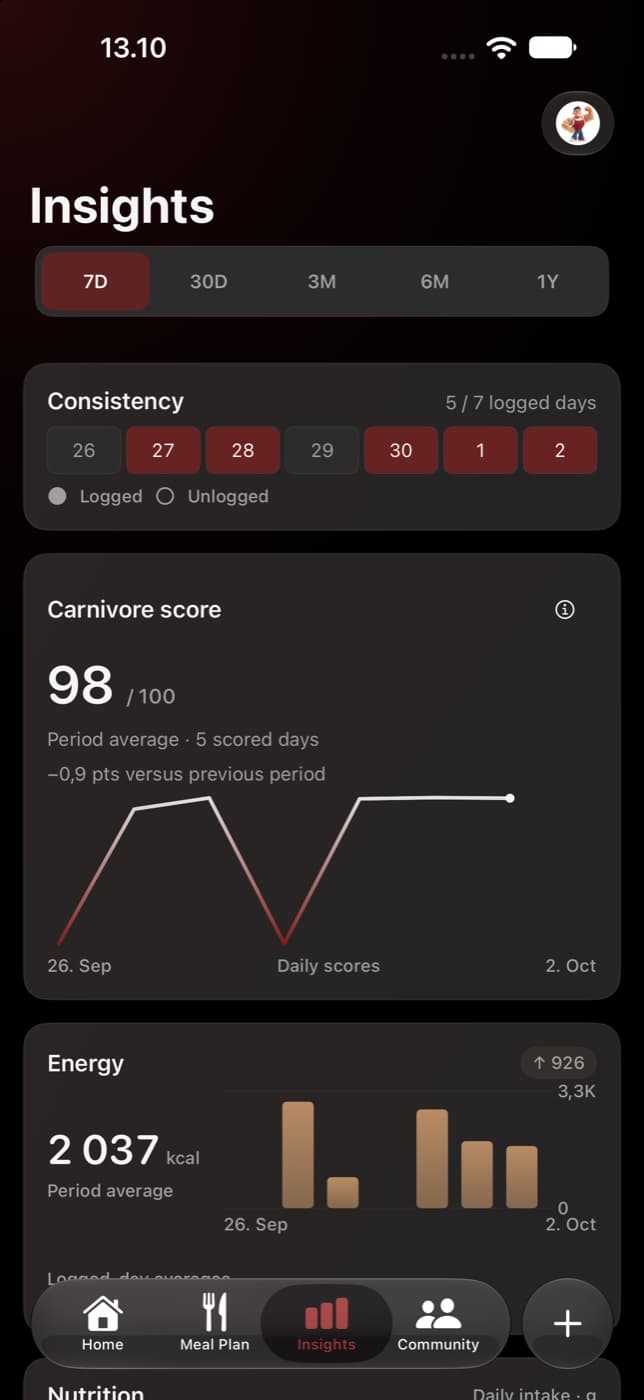
Choose the right range
| Range | Trend grouping |
|---|---|
| 7D and 30D | Daily observations. |
| 3M and 6M | Weekly groups. |
| 1Y | Monthly groups. |
7D includes today and the preceding six dates. 30D includes today and the preceding 29. The month and year ranges are trailing calendar ranges, rather than resetting at the start of a calendar week or month. Dates are resolved in your account’s timezone.
A longer view smooths day-to-day detail into groups. Check the selected group’s date range and whether it includes a partial week or month before comparing points.
Read protein, fat, carbs, and energy together
The nutrition section summarizes the calories and macros in your logged meals. Protein, fat, and carbohydrates describe the amounts recorded; energy is shown in calories. Review the displayed unit if you change macro units in the app.
A period average uses logged days rather than inserting zero intake for every unlogged date. A weekly or monthly nutrition point likewise summarizes recorded days in that group. It is not an estimate of food intake on days with no logs.
Remember that today is still taking shape
Today can appear in the overview and nutrition totals while its logs are still incomplete. Its numbers can change as you add meals. A sudden dip in the latest point may simply mean the day is unfinished or that fewer meals were recorded.
When reviewing a trend, look for similar logging coverage. Five carefully reviewed days and five dates with only one quick log do not necessarily describe the same amount of your routine.
Understand previous-period comparisons
Comparisons use an equal number of completed days before the selected period and exclude today from the current comparison window. The current headline summary can include today, so the comparison may not equal the difference between two displayed headline averages.
A comparison can be unavailable when there is no usable prior-period data or when the score evidence cannot be compared reliably. Unavailable does not mean “no change.” Read the explanation rather than treating it as a zero difference.
Use score and consistency as context
The Carnivore Score average is based on scored days, which can be fewer than the number of logged dates. Unknown or mixed food items can leave a score unavailable. Meal-only consistency and discipline also differ because discipline can include fasting days.
A practical review routine
- Choose a range and check its dates, logged-day count, and grouping.
- Look at calories and macros together, then inspect an unusual date or group.
- Check the underlying foods and portions before deciding the pattern reflects a change in your eating.
- Use a longer range when you want context, and a shorter range when you need to find a particular log.
Insights helps you read your record. It does not determine a personalized protein target, calorie prescription, or medical outcome.