Share meals with the Carnivor community
Community is a space for sharing meals and seeing what other members are doing. Your personal meal log and a community post are separate records: you choose what to share.
Create your community profile
Open Community and choose Join Community. The joining flow introduces the space, lets you set up a profile, and asks you to review the community guidelines. Follow the profile fields shown in the app before confirming.
Choose a display name and username you are comfortable using with other members. A bio, interests, or profile photo may help others recognize you, but review what you add as information you intend to share.
Prepare a post
- Open the Community composer, or use Share to Community from a meal when that action is offered.
- Review the caption and any attached meal photo. Edit the text to say what you actually want to share.
- Add available tags or an optional photo, and remove media you do not want included.
- Wait for any upload to finish, then review the complete post before tapping Post.
Sharing from a meal gives you a starting point for the composer; it does not mean the meal has already been published. Check the photo as well as the food: a picture can include people or background details you did not intend to share.
Use the feed thoughtfully
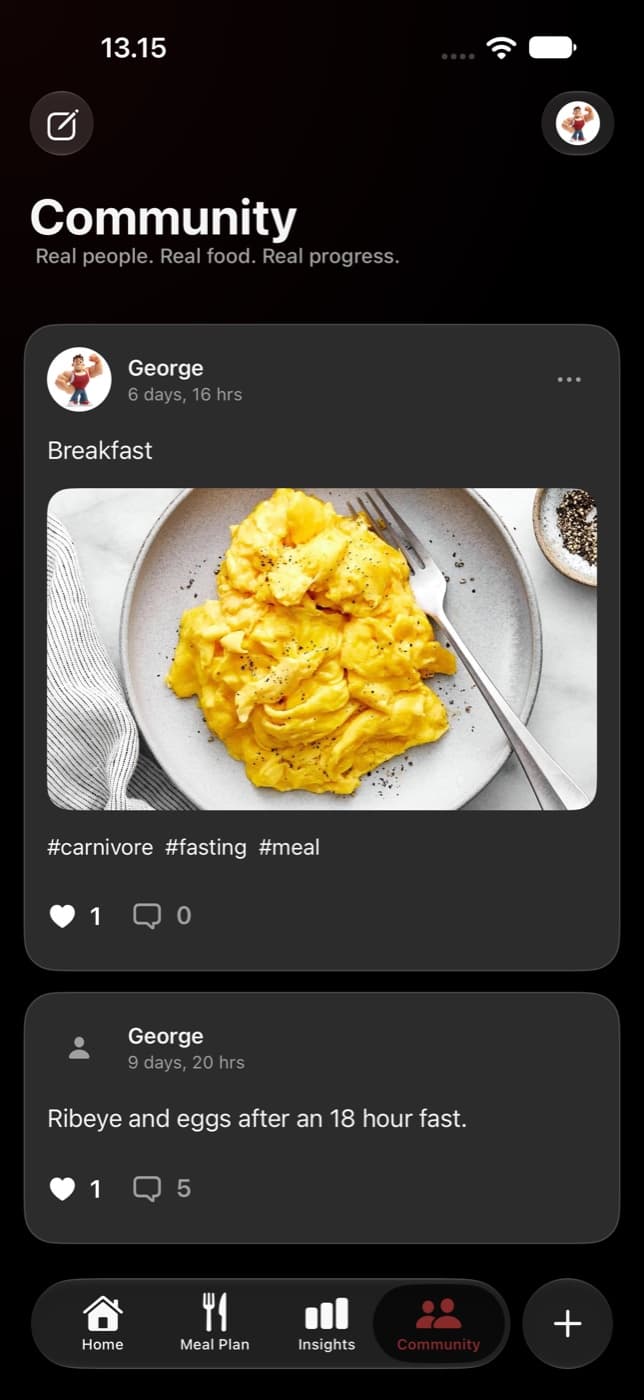
The feed shows shared posts with member names, captions, images when provided, and reactions or comments. You can respond to posts and use the available member or post controls in the app.
Meals and routines in a feed are personal examples. They are not proof that a portion, diet, or fasting duration is suitable for you. Use posts for ideas and conversation rather than treating another member’s routine as a prescribed goal.
Start with a meal you have reviewed
If you want to share a logged meal, first make sure the ingredients and portions are right. A reviewed nutrition record and an intentional caption make the post more useful to you and the people reading it.